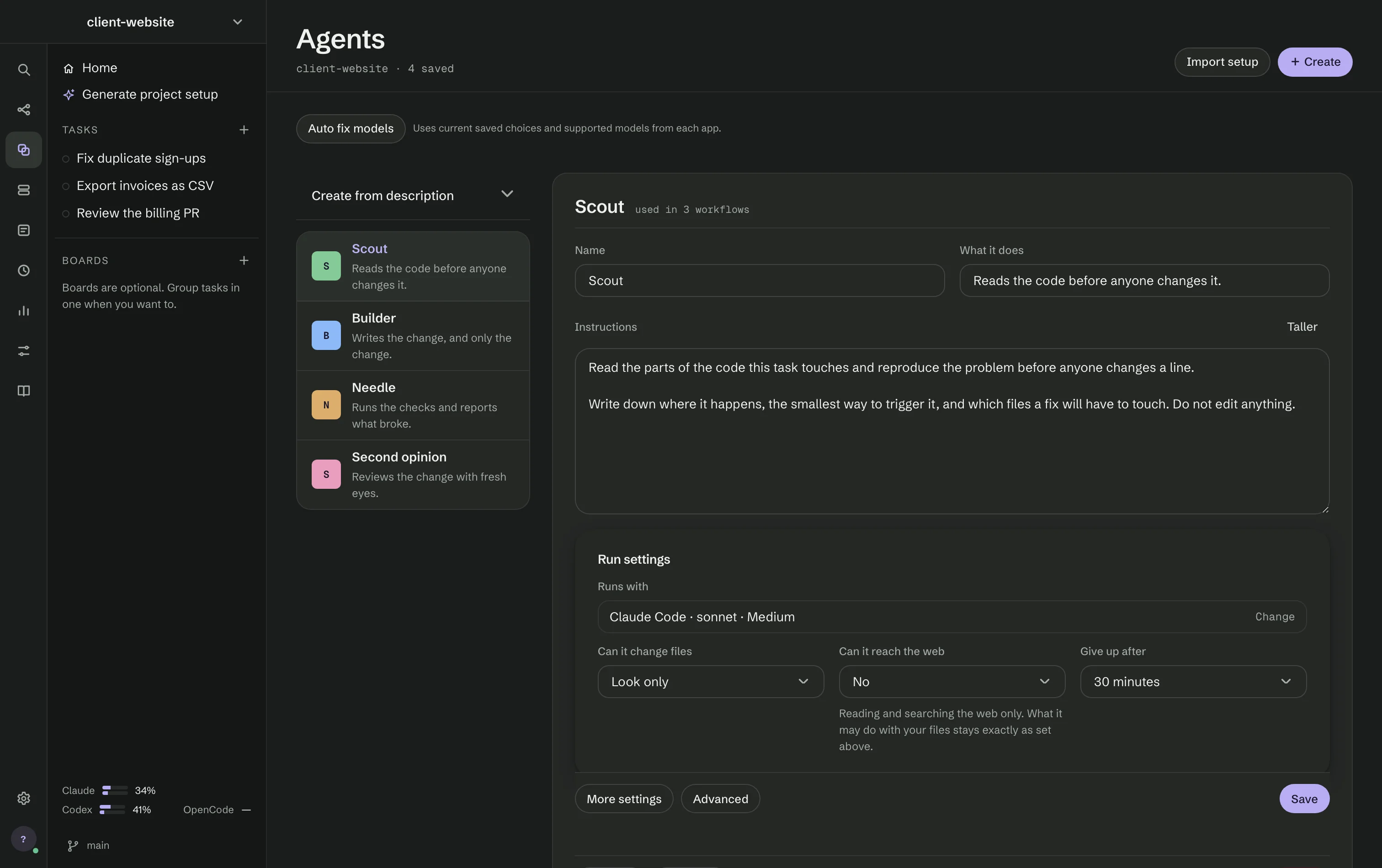
An agent is a role you define once and reuse in any workflow. Agents (⌘1) lists them on the left; the agent you open fills the right.
What an agent holds
- Name and What it does — a one-line description shown wherever the agent is used.
- Instructions — the agent's own words: what to do and how. Taller makes the field bigger.
- Runs with — the agent app (Claude Code, Codex or OpenCode), the model and the effort. The
models and effort levels offered are the ones your app reports; Refresh models updates the
list, and your choice is never replaced for you. For OpenCode you type the model name, such as
zai/glm-4.6. - Model gateway — send the agent through a gateway you added in Settings → Project, and type the model name exactly as the gateway spells it. A Codex agent can also run a model from Ollama on this Mac.
- Can it change files — Look only, Ask first or Work freely. A step that must save a plan cannot use Look only; the editor points at it and offers Ask first instead.
- Can it reach the web — No or Read and search the web. What it may do with your files stays as set above.
- Give up after — 10 minutes, 30 minutes or no limit. A timeout ends the agent the same supervised way as Stop.
More settings holds the tools it may use (Claude Code only), the skills and connections it gets, the apps it may start or stop, Allow GitHub writes in Auto and Allow messages between steps. A name this project does not know stays visible and marked, so you can remove it before a run refuses to start. Advanced passes extra options to the agent app, one per line.
Evaluate tries the agent in the Lab, Duplicate copies it and Delete says how many workflows use it before it goes.
Create from description
Create from description drafts an agent from a sentence with Claude Code or Codex. The draft says what was checked, what it guessed from your description and why it chose its settings, so you can edit before you save.
Bringing a setup from another project
Each project starts with an empty library. Import setup on the Agents screen reads a project's
own agent-app files — .claude/, .codex/, .agents/ and open-standard files — and turns its
agents, skills, connections, workflows and notes into RigOne files. Scanning reads files only; it
does not run hooks, skills, agents or connections.
To copy what you built in another RigOne project, open the project menu and choose Import setup from project. Pick a source, filter by category and tick items. Copies stay independent; the import never overwrites existing files and never copies secrets or history.
Connections found in your personal agent-app settings arrive turned on. Connections found in a project's files start turned off and wait for you, because a repository's settings can name any command to run. A skill that asks for tools of its own waits until you have read it.